Audit (PERMISSION_AUDIT)
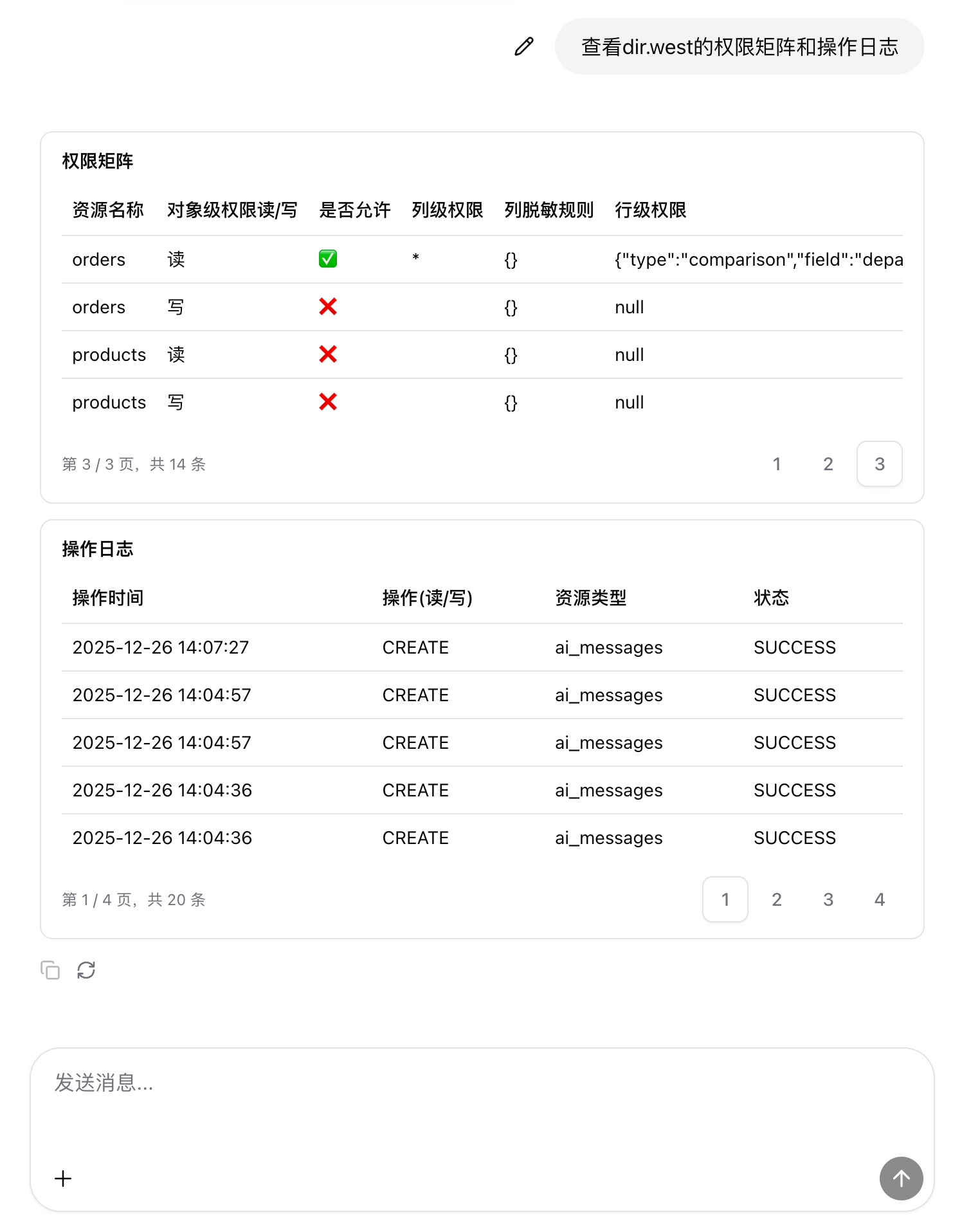
Audit scenarios focus on permissions and activity logs, for example:
- “Show the permission matrix and activity logs for dir.west.”
1. Intent detection
In code_parse:
- It scores keywords such as:
- permission, audit, activity log, access log, permission matrix, RBAC, ACL, etc.
- When matched, intent is determined as
PERMISSION_AUDIT.
In other code nodes there are additional parsers for audit-related utterances, for example:
- Use regex to extract principal from phrases such as:
查看 (xxx) 的权限.*操作日志→ extractprincipal
2. Intent routing
In the condition_intent node:
- When
intent === 'PERMISSION_AUDIT', the workflow enters the audit branch.
3. Call permission and audit APIs
In the audit branch, the workflow:
- Calls permission-related APIs (resource policies and effective permissions), such as:
/metadata/resource-policiesor dedicated permission query APIs.
- Calls audit log query APIs:
- often implemented as
/data/queryover an audit table, filtered by principal for recent actions.
- often implemented as
Results are aggregated into two datasets:
- Permission matrix (each row represents permissions on a resource)
- Activity logs (time, action, resource type, status, etc.)
4. Frontend rendering of permission matrix and audit table
In the rendering script of ai-chat.json, when intent === 'PERMISSION_AUDIT' and permissionsBody and auditBody are present:
- Parse them into internal arrays
permissionsandauditlogs. - Build two table results:
- “Permission Matrix”: resource name, object-level permissions, column-level permissions, masking rules, row-level permissions, etc.
- “Activity Logs”: time, action, resource type, status, etc.
- Return two
dataGridtool calls:- one for the permission matrix
- one for the activity logs
The chat2 frontend then:
- uses data grid components to render permission views with scrolling/pagination
- uses another table to display activity logs for audit and troubleshooting.