Modeling (MODEL_GENERATION)
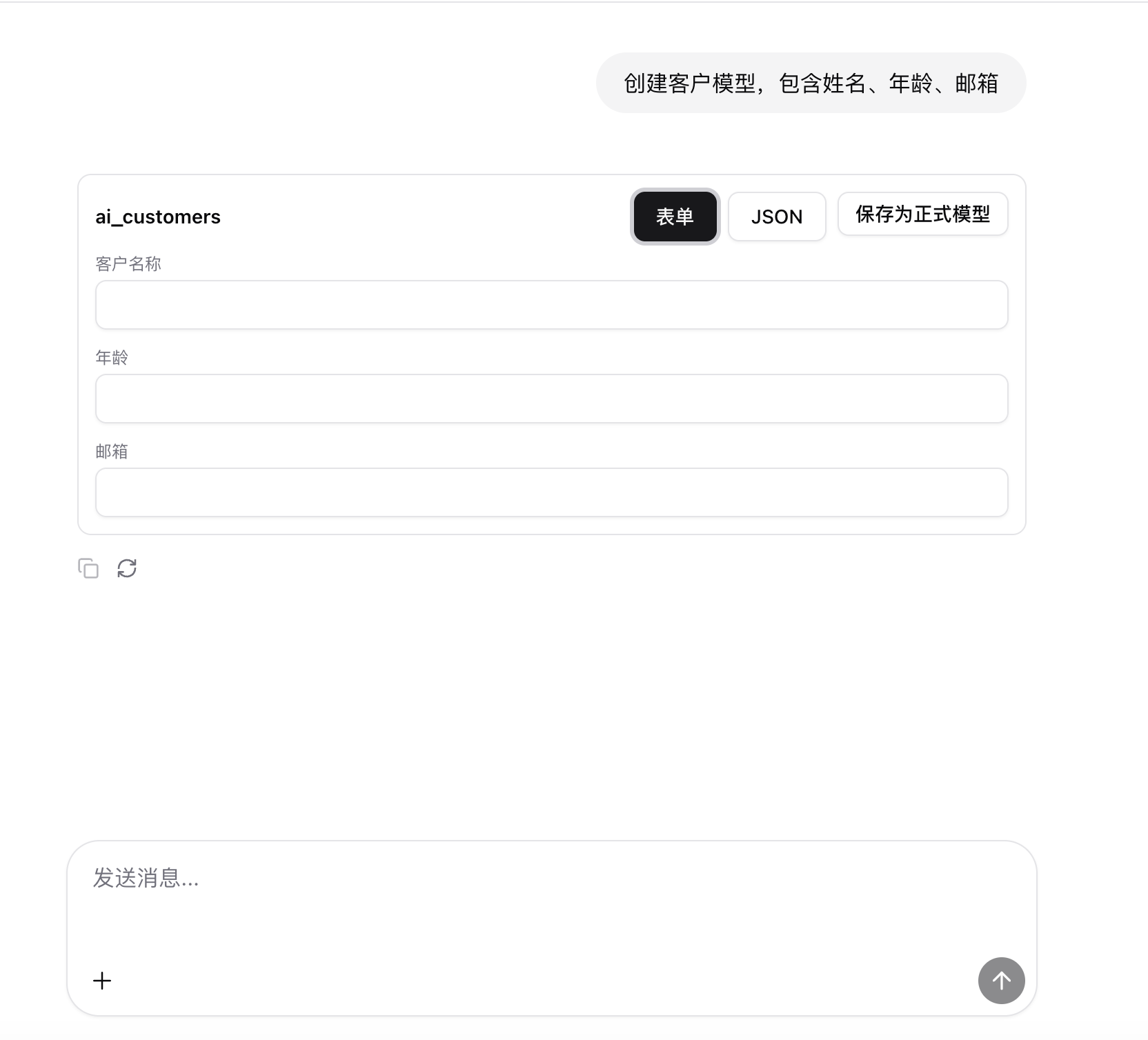
This section describes the end-to-end flow from chat2 to ai-link when the user asks for “modeling”-type requirements.
Typical utterances:
- “Create a customer model with name, age, and email.”
- “Design an order table with amount, customer, and order time.”
0. Prompt
You are a metadata modeling assistant. You must output only a JSON array.

Return structure:
[{
  "entity": "ai_orders",
  "description": "Orders",
  "fields": [
    {
      "name": "customer_name",
      "type": "string",
      "label": "Customer Name"
    }
  ]
}]

Constraints:
1. Output JSON only, no explanation or markdown
2. type must be one of: "string","number","date","enum"
3. For enum fields, if there are options, use the choices array
4. name uses snake_case, for example "customer_name"
5. label uses short Chinese or English titles
6. entity uses table-style names, such as "ai_customers","ai_orders"
1. Intent detection
In workflow ai-chat.json:
- Node
start_chatreceives the conversation message arraymessages. - Node
code_parse:- extracts the latest user message as
query - builds a
historystring - analyzes context keywords and derives a high-level
intentsuch asMODEL_GENERATION
- extracts the latest user message as
Key logic (paraphrased):
- If keywords like “建模, 模型, 表结构, 字段, schema, 实体” appear, intent is judged as
MODEL_GENERATION.
2. Intent routing
In the condition_intent node, routing is based on code_parse.intent:
- Branch port keys include:
MODEL_GENERATIONDATA_QUERYDATA_MUTATIONDATA_ANALYSISPERMISSION_AUDITEXAMPLE_UI
When intent is MODEL_GENERATION, the workflow takes the “modeling” branch.
3. LLM generates model draft
In the modeling branch, an LLM node (for example llm_model) is called:
- provider / modelName / apiHost / apiKey are configured on the node
systemPromptforces the LLM to output only a JSON array- Sample output:
[
  {
    "entity": "ai_customers",
    "description": "Customers",
    "fields": [
      { "name": "name", "type": "string", "label": "Name" },
      { "name": "age", "type": "number", "label": "Age" },
      { "name": "email", "type": "string", "label": "Email" }
    ]
  }
]
4. Frontend renders the model form
In subsequent code nodes, the model JSON is converted into a UI Schema that the frontend can render, and returned to chat2 as a tool card.
In ai-chat.json, there is a script (paraphrased):
- When
intent === 'MODEL_GENERATION'andmodelSchemaexists:- build a form description object containing
entity,fields,initialValues, and save actions - return it in a tool call:
toolName: "modelForm"result: the form definition
- build a form description object containing
The chat2 frontend uses toolName: "modelForm" to render a modeling form component, allowing the user to:
- adjust fields (name, type, label, etc.)
- click save/submit to send the final modeling request to the backend (typically Looker
metadataAPIs)
5. Corresponding APIs and persistence
When the user confirms the model in the form:
- The frontend calls Looker metadata APIs:
/metadata/entities/metadata/fields
- It persists the LLM-generated structure plus user edits as real entities/fields, completing the modeling process.