Data Entry (DATA_MUTATION)
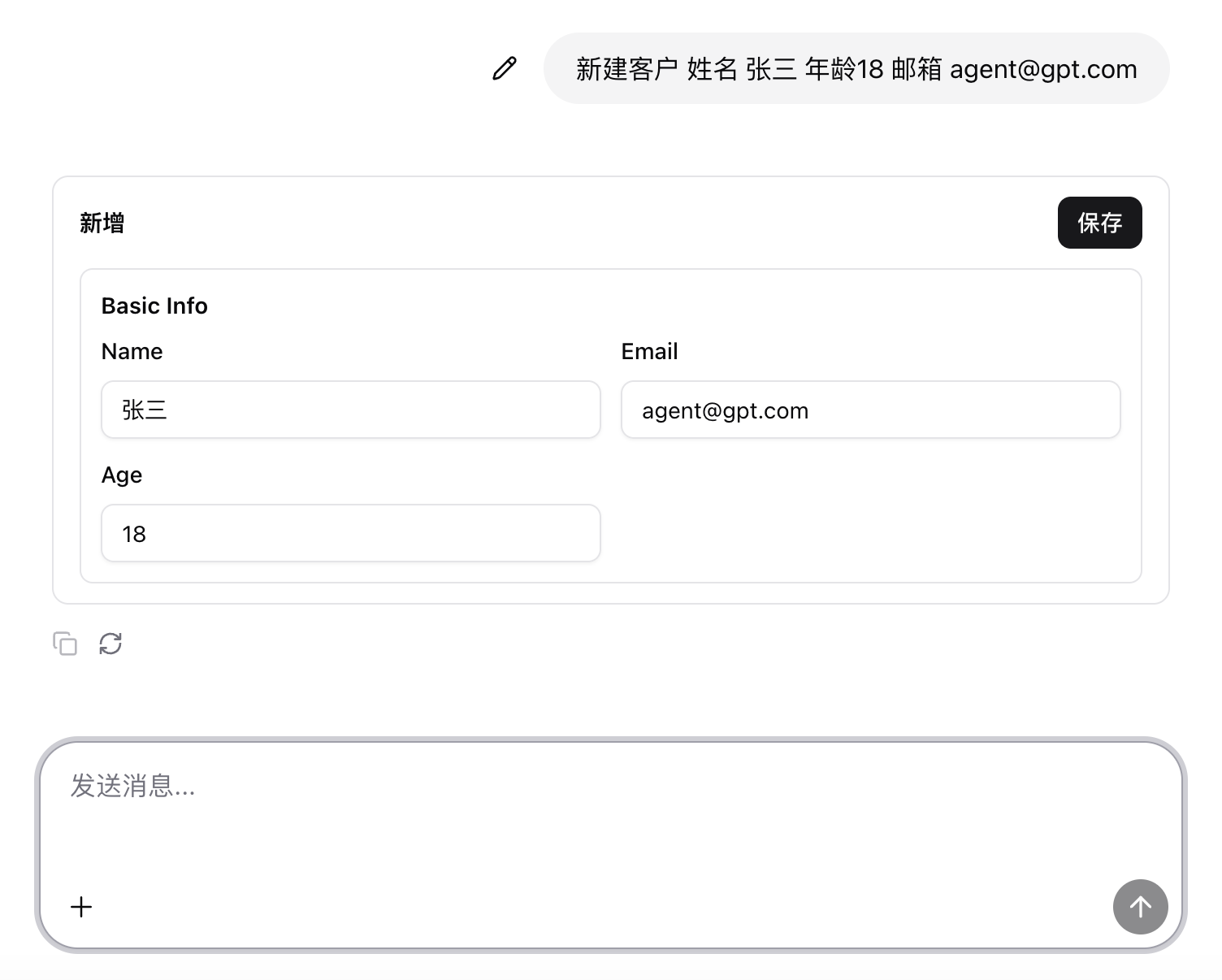
Data entry operations refer to creating or updating business data, for example:
- “Create a new customer: name Zhang San, age 18, email agent@gpt.com.”
- “Change the amount of order 12345 to 1000.”
0. Prompt
## 236135 - Detect data creation

### systemPrompt
You are a "create-object intent parser". Your task is: given metadata and user conversation, generate JSON for a "Create" scenario in the form:

{"resource":"orders","defaultValue":{"is_published":true,
"order_amount":3000}}

## Input
I will provide two parts:

1. metadata: system metadata, including:
- available resources (resources)
- fields for each resource (field), type, whether writable/creatable
- field aliases/synonyms (aliases)
- enum/dictionary values (enums) and reference fields (if any)
2. conversation: user dialogue (context plus latest request)

## Output (strictly)
- Output only a single JSON object, no explanation, no markdown, no extra text.
- Only two top-level keys: resource and defaultValue.
- resource:
  - must be a resource name present in metadata.resources
  - choose the best-matching resource from conversation; if multiple, pick the most likely
- defaultValue:
  - must be an object ({} allowed)
  - keys must be real field names that exist and are writable for the resource (if the conversation uses aliases, map them to real field names)
  - value types must match field types (boolean/number/string/array/ISO date string, etc.)
  - path keys such as a.b or items[0].name are allowed only if metadata declares them writable or the field exists
- Do not output fields that do not exist in metadata or are not writable; when unsure, omit the field.

## Parsing rules
- Extract fields and default values for creation from conversation:
  - “已发布/未发布 (published/unpublished)” → is_published: true/false (or mapped to real field)
  - “订单金额默认 3000 / 起始金额 3000 (default order amount 3000)” → order_amount: 3000 (field name mapped from metadata)
  - phrases like “默认今天/本月 (today/this month)” → convert to ISO strings (e.g. created_at: "2025-12-26" or full ISO)
  - enum/status values must fall within metadata enumerations; otherwise do not output that field
- Only output defaults explicitly requested or strongly implied; do not invent fields.
1. Intent detection
In code_parse in ai-chat.json:
- There are dedicated rules for verbs and objects related to data entry:
- Verbs: create, new, add, insert, update, modify, edit, delete, void, import, etc. (Chinese equivalents)
- Objects: customer, order, product, contract, invoice, expense, etc.
- If both a verb and an object are detected, the intent is judged as
DATA_MUTATION.
2. Intent routing
In the condition_intent node:
- When
intentisDATA_MUTATION, the workflow follows theDATA_MUTATIONbranch into the data entry flow.
3. LLM generates mutation DSL
In the data entry branch, typically:
- An LLM node is called to convert natural language into a mutation DSL, including:
- entity name (such as
customers,orders) - operation type (insert / update / upsert / delete)
- fields and values
- entity name (such as
Conceptual output example:
{
  "entity": "customers",
  "op": "insert",
  "values": {
    "name": "张三",
    "age": 18,
    "email": "agent@gpt.com"
  }
}
4. Execute mutation and frontend feedback
Subsequent workflow steps:
- Call Looker’s data mutation API
/data/mutation/execute. - Build frontend responses based on results:
- On success: return confirmation or guide the user to view the newly created record.
- On failure: return error information and retry suggestions.
In ai-chat.json, when intent === 'DATA_MUTATION':
- Generated forms/results are wrapped as a
crudFormtool call:toolName: "crudForm"result: UI Schema for create/edit forms
The chat2 frontend renders the data entry form based on this tool call and triggers the corresponding workflow/API after the user submits.